

Description
Some problems scream; the ones that cost you most stay silent. Checkout breaks, order emails vanish, a payment gateway switches off, the site white-screens after an update — and every hour of it costs you sales. And finding the cause is a second bill you can’t read: hours of developer “discovery” you pay for but can’t follow.
DiagnosticIQ watches around the clock — and when something breaks, diagnoses it with AI we’ve built and tuned specifically for WooCommerce. We engineered it around how Woo stores actually fail, and keep it current as WooCommerce, its gateways, and its plugins change — so you’re diagnosed against today’s failures, not last year’s. It can email you when your store’s health drops (opt-in alerts, delivered through your site’s own email — see the FAQ), then names the root cause and the exact fix in plain English: the steps to fix it yourself, and what to hand your developer with a head start. See it in action on a live demo store — open the sandbox in your browser, no install needed.
Free: Store Health Dashboard
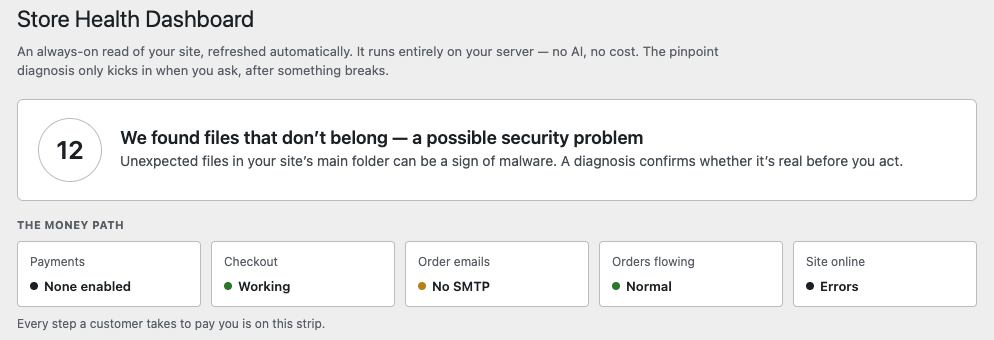
An always-on read of your store, refreshed automatically. Runs entirely on your server — no external calls, no AI, no cost.
- Your money path, watched live — payments, checkout, order emails, orders flowing, site online: every step a customer takes to pay you, each with a live status. Catch a break the moment it happens, before it costs you a sale.
- Around-the-clock watch on your most valuable asset — 24/7, DiagnosticIQ guards the store your business runs on. It flags the silent sales-killers that quietly cost you orders — a payment gateway switched off, order emails not sending, checkout erroring out, order flow stuck — and the nastier surprises too: files in your site root that don’t belong (an early sign of malware), plus a snapshot of the plugin, theme, and WooCommerce versions you’ll need when something breaks.
- Opt-in email alerts — scheduled scans can email you when a new critical problem or a health-score drop appears. Alerts are opt-in, and delivery rides your site’s own email (see the FAQ) — everything an alert would tell you is always on the dashboard too. Free for everyone.
Paid service: AI diagnosis & fix
When something actually breaks, the free dashboard tells you that it’s broken. The AI diagnosis — performed by our external diagnosis service — tells you why, and gives you the exact steps to fix it.
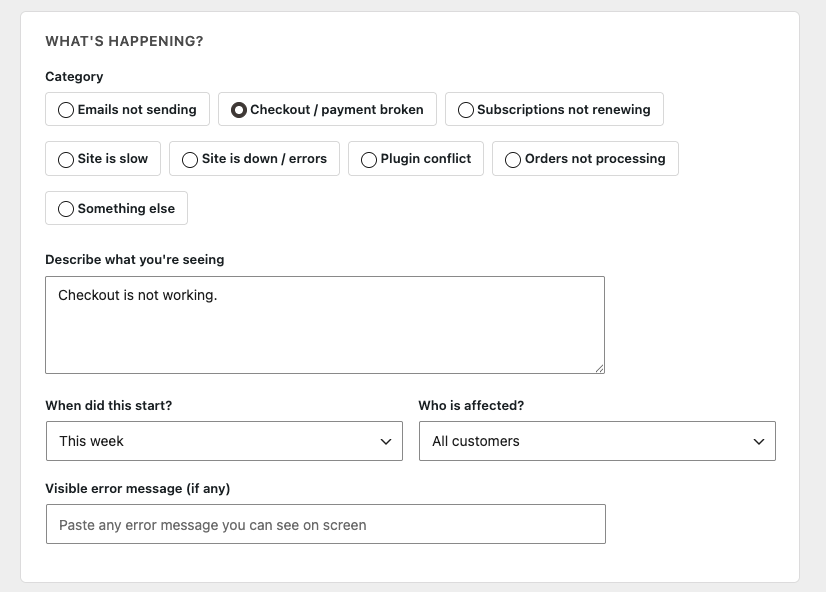
- Tell it what you’re seeing, in your own words. “Checkout isn’t working,” “orders stopped coming in” — no logs to pull, no jargon to learn. Guided intake turns a symptom into a diagnosis.
- Purpose-built AI for WooCommerce — not generic slop. It reasons over your store’s own signals — plugin and theme inventory, versions, recent errors, mail failures, config — against the WooCommerce failure patterns it’s built to recognize, and names the root cause and the exact fix steps in plain English.
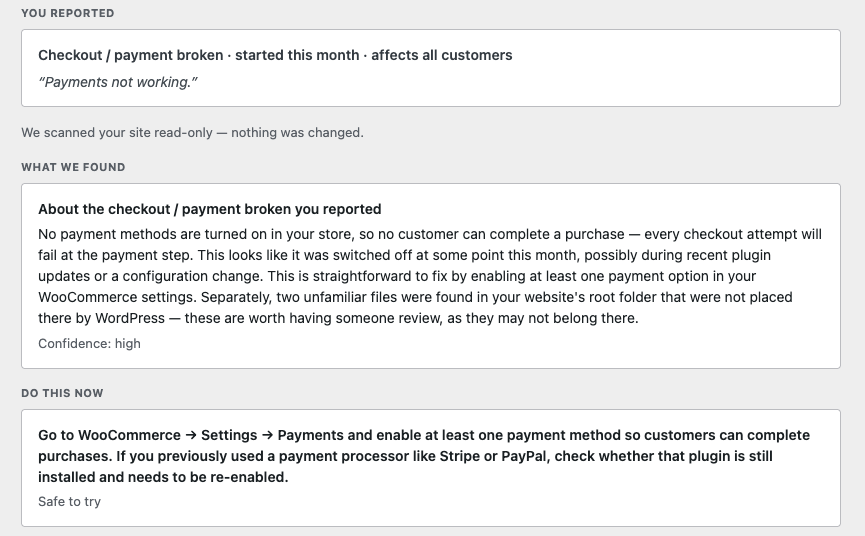
Every diagnosis ends with the fix. You never get “here’s what’s wrong” and nothing else — each report closes with a prioritized fix, split so you know exactly what’s yours and what’s your developer’s:
- Safe to try yourself — store-owner steps with no risk (re-enable a gateway, flip a setting back, clear a stuck queue), in plain English.
- Hand to your developer — anything needing code or deeper access, written as a scoped brief (the cause, the signals behind it, the suggested fix) so they start at the solution, not discovery.
- Confidence & safety on every step — each step is flagged for how sure the diagnosis is and whether it’s safe to run, so nothing gets applied blind. And it’s all read-only: DiagnosticIQ shows you the fix, never touches your site.
Your first 2 AI diagnoses are free on every site — no account, no card, no license key. After those, the AI diagnosis & fix is a paid subscription service (20 diagnoses a month — more than any store needs — from $45/mo, or $269.99/yr) — details at wptechhouse.com. Everything else shipped in this plugin works without paying anything; see “External services” below for exactly what the service sends and when.
Who is this for?
- Store owners who want to know what’s wrong before paying a developer to find out.
- Agencies and freelancers who want the root cause in minutes when a client’s store breaks.
Built by
DiagnosticIQ is designed, built, and backed by Prima Digital.
External services
The free Store Health Dashboard runs entirely on your server and makes no external calls. No screen or scheduled task ever contacts an external service on its own — the plugin only connects when you click “Run diagnosis” (with or without a license key), or when a saved license key is validated.
The plugin connects to our diagnosis service (billing.wptechhouse.com, operated by Prima Digital) in two situations:
- License validation (only if you save a license key) — your license key and site URL are sent to verify your subscription. This happens when you save or validate a key, and is then re-checked automatically (up to twice a day) while you have the plugin’s admin pages open. No store data is sent during validation.
- Running a diagnosis — when you click “Run diagnosis,” the diagnostic payload is sent to our service, which uses the Anthropic Claude API to generate the plain-English report. This applies to your free diagnoses too: your first 2 diagnoses per site are free and need no key — for those, your site address is sent instead of a license key so the service can track the per-site free allowance. The payload contains: your store/site configuration, the active plugin and theme inventory with versions (including mu-plugins and drop-ins), server, PHP and database versions, relevant WordPress configuration flags, recent error-log excerpts (which may include messages written by other plugins on your site), the filenames of unexpected files found in your site root, recent mail-failure reasons, and the problem description you type. Before sending, the payload is scrubbed of personal data and secrets — email addresses, phone numbers, IP addresses, and API keys/tokens are redacted. Customer and order records are never included.
Data sent to run a diagnosis is processed by Anthropic on our behalf. Anthropic’s terms: Commercial Terms · Privacy Policy.
Screenshots
Installation
- Install and activate the plugin through the WordPress Plugins screen.
- Open DiagnosticIQ in your admin menu — the Store Health Dashboard starts working immediately, free.
- When something breaks, run an AI diagnosis from the Diagnose screen — your first 2 diagnoses are free on every site, no key needed.
- (Optional) Add a license key under DiagnosticIQ Settings for 20 AI diagnoses a month ($45/mo, or $269.99/yr).
FAQ
-
Is the free version actually useful, or is it a trial?
-
It’s genuinely free and standalone. The Store Health Dashboard, money-path strip, local problem rules, unexpected-file scan, and opt-in email alerts (sent via your site’s own email — see the alerts FAQ) run forever on your server with no account, no key, and no external calls. On top of that, your first 2 AI diagnoses are free on every site — no key needed.
-
Does the free version send my data anywhere?
-
No. It runs entirely locally. Only the AI diagnosis sends data (including your free ones), only when you run one, and only the diagnostic payload described under “External services” above.
-
Will the diagnosis change anything on my site?
-
No. DiagnosticIQ is read-only. It reports; you (or your developer) decide what to do.
-
I have a developer — how does this help them?
-
It hands them the case already worked up, so they don’t start from zero. Each diagnosis is a scoped brief: the root cause, the specific signals behind it (the plugins, settings, versions, and recent changes involved), and a suggested fix path — so they skip the billable “discovery” phase and start at the solution. From there they apply their own expertise, playbooks, and coding tools to ship the fix fast. You pay for the fix, not the hunt.
-
Does it work with my payment gateway / theme / host?
-
The dashboard reads standard WooCommerce and WordPress state, so it works anywhere WooCommerce runs — any host, any gateway, any theme. Some tier-1 rules go deeper for Stripe.
The one exception: the AI diagnosis and license check need your site to be able to reach our service at billing.wptechhouse.com over HTTPS. Almost every host allows this. If your site is locked down with WordPress’s
WP_HTTP_BLOCK_EXTERNALsetting, addbilling.wptechhouse.comtoWP_ACCESSIBLE_HOSTSand everything works. -
How do the automatic background scans run?
-
Scans run on your site’s own WordPress scheduler (WP-Cron), which fires when your site gets visits. On most hosts that’s plenty. Two setups worth knowing about: very quiet sites may go longer than the chosen interval between scans, and some hosts replace WP-Cron with their own scheduler (Kinsta and Pantheon do this for you automatically; on WP Engine you can switch on “Alternate Cron” in your portal). If the dashboard’s “last scan” time looks old, asking your host to run
wp-cron.phpon a server schedule fixes it for good — it’s a standard, five-minute request. Your dashboard always shows when the last scan actually ran, so you can see for yourself that the watch is on. -
Will alert emails definitely reach me?
-
Alerts use your site’s standard WordPress email, so they’re only as reliable as your site’s email in general. Many hosts deliver it fine; some (by their own recommendation) need an SMTP plugin for dependable delivery. Everything an alert would tell you is also always on the dashboard.
-
Does it work on multisite?
-
It’s built and tested for single-site WooCommerce stores. It may run on multisite, but we haven’t verified it there yet — if you run a network and want this, tell us and we’ll test it with you.
-
Do I need WooCommerce?
-
Yes. The plugin is built for WooCommerce stores and requires WooCommerce to be installed and active.
Reviews
There are no reviews for this plugin.
Contributors & Developers
“DiagnosticIQ for WooCommerce” is open source software. The following people have contributed to this plugin.
Contributors
Translate “DiagnosticIQ for WooCommerce” into your language.
Interested in development?
Browse the code, check out the SVN repository, or subscribe to the development log by RSS.
Changelog
0.8.3
- Loopback checks that fail at the network level (timeout, connection refused) now read “couldn’t verify” instead of raising a false critical.
- Health dashboard gains real heading structure for screen readers (visuals unchanged).
- “Still open” list now tracks the diagnosed issue by its stable key, so editing the description no longer resurfaces it.
- Plugins-list “View details” no longer shows “Version 0.0.0” on unlicensed installs.
- Admin screens now consistently use the DiagnosticIQ display name.
0.8.2
- Pricing updated: the paid plan is now $45/mo, with a new annual plan at $269.99/yr (50% less than paying monthly). Both include priority support — email us about any diagnosis and we’ll help you read it and work out the fix.
- After your first diagnosis that finds something, the plugin’s own screens ask (once, politely) for a WordPress.org review. One click to say “maybe later” or “I already did” — it never blocks anything and never appears outside the plugin’s pages.
0.8.1
- Honest under every host: an overdue background scan now says so (with how to fix it), a file check that couldn’t run no longer looks “clean”, and password-protected sites no longer trigger false “broken” readings.
- Diagnoses in progress survive aggressive object caches; health screens refresh properly behind LiteSpeed-style page caches.
- Clearer copy: the paid plan is described as 20 diagnoses a month everywhere; email alerts are described as opt-in and delivered through your site’s own email; a heads-up before your last free diagnosis.
- Calmer visuals: severity badges unified to the dashboard’s neutral style; other plugins’ banners no longer push our screens below the fold.
0.8.0
- Free tier: your first 2 AI diagnoses are free on each site — no card, no license key. The dashboard and diagnosis screens show how many you have left.
- A license now covers a monthly allowance of 20 diagnoses; settings and admin copy updated to say so (a key is no longer required to try a diagnosis).
0.7.10
- Declare WooCommerce as a required plugin (Requires Plugins header, WordPress 6.5+ plugin dependencies).
0.7.9
- Maintenance: initialize health-alert defaults on activation. Alerts remain opt-in on this build — no email is sent until you enter one in Settings.
0.7.8
- The site-root file check now uses the WordPress Filesystem API (read-only; nothing is written).
- Removed an unnecessary core-file include and an error-level read.
0.7.7
- Privacy: IP-address scrubbing now catches all public addresses (a 0.7.6 refinement could miss some); plugin version numbers are still preserved.
- Internal prompt constants no longer use HEREDOC/NOWDOC syntax, per WordPress.org coding guidance.
- Minor packaging and header tidy-ups.
0.7.6
- Removed the development README from the WordPress.org package.
- Upgrades from 0.7.4 now migrate the existing diagnostic log instead of deleting it, and uninstall also cleans data left by pre-rename versions.
- Smarter scrubbing: plugin version numbers are no longer mistaken for IP addresses.
- Alert emails are rate-limited so an intermittently failing check cannot re-email on every scan.
- Add-ons: activation no longer requires a specific base-plugin folder name, and each add-on now cleans up after itself on uninstall.
0.7.5
- Renamed the plugin and its internal code prefix for WordPress.org directory compliance. Existing installs migrate their settings, license, and history automatically on update.
- The add-on unlock now completes on our website rather than charging in wp-admin.
- External-services documentation expanded to enumerate exactly what a diagnosis sends and to name Anthropic as the processor.
- Scrubbing now also redacts IP addresses and full email addresses before a diagnosis is sent.
- Hardening: prepared SQL for order/session counts, CSV-export formula-injection guard, musl-safe uninstall, IIS/autoindex log-directory guards, HPOS compatibility declaration, optional admin-bar pill toggle.
0.7.4
- Scheduled-scan email alerts are now free for everyone (no longer license-gated).
- All admin JS/CSS moved to properly enqueued assets.
- Diagnostic log now resolves its path via wp_upload_dir() for multisite/custom-uploads compatibility.
- Error handler no longer overrides the site-wide PHP error_log destination.
0.7.3
- WordPress.org release: directory-served updates (no bundled update checker).
- Hardened debug-log handling; legacy log files removed on upgrade.
- Expanded PII scrubbing (phone numbers) before any diagnosis is sent.
- Free tier is fully silent without a license key — no external calls.
0.6.14
- Expanded signal taxonomy: tier-1 rules plus Stripe, cache-loopback, and HPOS collectors.
- Store Health Dashboard refinements.
- Licensing and diagnosis reliability fixes.
0.6.0
- Store Health Dashboard with money-path strip.
- Async diagnosis engine.
0.1.0
- Initial release: guided intake and plain-English diagnosis.