

Description
Reactive WordPress without writing JavaScript.
HyperPress brings modern hypermedia to WordPress. Use HTMX or Datastar to build rich, interactive blocks and pages, all with the simplicity of PHP. Alpine rides alongside HTMX for the lightweight client-side reactivity HTMX lacks. No JavaScript build step, no React, no webpack, no client-side state to manage. You write HTML attributes and server-side PHP; the hypermedia libraries handle the interactivity.
Hypermedia is an old idea applied to the modern web. Instead of shipping a heavy JavaScript SPA that talks JSON to a REST API, you let the server render HTML fragments and swap them into the page. The result is simpler code, smaller payloads, and a development model that stays close to how WordPress already works. Read more about hypermedia.
📦 TWO HYPERMEDIA ENGINES, ONE PLUGIN
HyperPress bundles two hypermedia engines locally, from the plugin folder (no external requests unless you opt in):
- HTMX with Hyperscript for attribute-driven AJAX, partial HTML rendering, and progressive enhancement.
- Datastar for reactive, server-driven SSE-style updates with fine-grained DOM patching.
HTMX has no built-in client-side reactivity, which is the gap Datastar fills natively. To close that gap on the HTMX side, HyperPress also bundles Alpine Ajax with Alpine.js as a companion to HTMX, for lightweight reactive components and small client-side expressions.
Pick one engine per block, or mix and match. Each library loads only when you use it.
🔌 REST ENDPOINT FOR HYPERMEDIA
HyperPress exposes a dedicated /wp-html/v1/ REST namespace built for partial HTML rendering. Your server callbacks return HTML fragments, not JSON. The hypermedia libraries request that HTML and swap it into the page. This is the core of the reactive loop:
- A user interacts with an element (click, input, scroll).
- HTMX, Alpine Ajax, or Datastar issues a request to
/wp-html/v1/. - Your PHP callback renders an HTML fragment.
- The library swaps the fragment into the DOM.
No client-side templating. No JSON serialization of data you only need to display. The server stays the single source of truth.
🧱 BUILD GUTENBERG BLOCKS WITH PHP
Through the bundled HyperBlocks library, HyperPress lets you register and render WordPress Gutenberg blocks using PHP templates and block.json, with server-side rendering. No React, no JSX, no build pipeline. Two authoring modes:
- Fluent API: build blocks programmatically with a readable PHP chain.
- block.json: the standard WordPress approach, with HyperPress handling field wiring and server-side render.
Templates use the .hp.php, .hm.php, and .hb.php extensions and are served from your theme’s hypermedia/ directory or custom registered paths. Combine blocks with the custom-field system below and you get editable, reactive content without touching JavaScript.
🎚 CUSTOM FIELDS AND OPTIONS PAGES
Through the bundled HyperFields library, HyperPress gives you a decoupled custom-field system with conditional logic, options pages, and export/import. Define fields in PHP, render them in the block inspector or on an options page, and read values with the hf_get_field() helper. This replaces the need for a separate custom-fields plugin when you build hypermedia-driven sites.
🧩 GLOBAL HELPER FUNCTIONS
HyperPress exposes one helper prefix per library, mirroring how WordPress itself exposes helpers:
hp_*for HyperPress (for examplehp_get_endpoint_url(),hp_get_option())hf_*for HyperFields (for examplehf_field(),hf_get_field())hb_*for HyperBlocks (for examplehb_block(),hb_field())
All helpers are function_exists-guarded for first-to-boot safety, so a second plugin shipping the same libraries never fatals.
🔌 AJAX, PARTIAL RENDER, AND SERVER-SENT EVENTS
Because HyperPress returns HTML fragments from the server, you get several patterns for free:
- AJAX: standard HTMX
hx-get/hx-postrequests that swap HTML. - Partial HTML rendering: render only the part of the page that changed.
- Server-Sent Events (SSE) and reactive streams via Datastar, for live data and dashboards.
- Out-of-band swaps: update multiple page regions from a single response.
- Progressive enhancement: forms and links keep working before JavaScript loads.
🔒 LOCAL-FIRST, CDN OPT-IN
For privacy and security, every third-party library is served locally from the plugin folder by default. No request leaves your site. If you prefer a CDN, there is an explicit opt-in (using the unpkg.com service). You must turn it on deliberately; it is never enforced.
🧰 EXTENSIBLE WITHOUT EDITING CORE
HyperPress is built around WordPress hooks. Customize routing, rendering, asset loading, and admin behavior without touching plugin files:
- Filters and actions for every extension point.
hyperpress/admin/show_menuto show or hide the Settings page when HyperPress is consumed as a library.- Template loader hooks so you can serve templates from custom paths.
- First-to-boot
LOADEDguards in each library prevent double-initialization when multiple plugins bundle HyperPress.
🌐 MULTISITE, PERFORMANCE, AND TRANSLATION
- Multisite compatible: activate per-site or network-wide.
- Performance: libraries load only when used; no global scripts on every page.
- Translation ready: contribute translations via translate.wordpress.org.
- Developer friendly: clean namespacing,
::classreferences throughout (Mozart-prefix safe), and committedvendor/so WordPress.org users get a working zip without running Composer.
🛠 HOW IT WORKS
The reactive loop in HyperPress is a thin layer over standard WordPress rendering:
-
You add a hypermedia attribute to an element. With HTMX, for example, a search box can request results as the user types:
<input type="search"

   name="q"

   hx-get="/wp-json/wp-html/v1/search"

   hx-trigger="keyup changed delay:300ms"

hx-target="#results"> -
The request hits the
/wp-html/v1/REST namespace, which HyperPress registers for partial HTML rendering. - Your PHP callback runs a normal WordPress query and returns an HTML fragment, not JSON.
- HTMX swaps the fragment into
#results. The URL, history, and server state stay in sync automatically.
The same loop works with Alpine Ajax (x-ajax) and Datastar (signals + SSE). You pick the library that fits the interaction; HyperPress handles routing and rendering for all of them.
💡 COMMON REACTIVE PATTERNS
Because the server returns HTML fragments, these patterns become a few attributes instead of a JavaScript module:
- Live search: filter a list as the user types, with a debounce trigger.
- Infinite scroll: append the next page of results when the user reaches the bottom.
- Form submission and validation: POST a form, return the updated fragment or inline validation errors, no page reload.
- Inline edit: click to edit a field, submit, swap the saved value back.
- Modal dialogs: load a partial into a modal, close it, update the row behind it.
- Live dashboards: stream updates over Server-Sent Events with Datastar for real-time data.
- Dependent selects and conditional fields: refresh part of a form when a selection changes.
- Out-of-band swaps: update the cart count and the cart body from a single add-to-cart response.
⚖ HYPERMEDIA VS A JSON REST API / SPA
The default modern approach is a React or Vue SPA that calls a JSON REST API. That model is powerful but adds a build step, a client-side state layer, and JSON serialization for data you only display. HyperPress offers a lighter path:
- The server renders HTML, the same way WordPress already renders templates.
- The client swaps fragments, with no client-side template engine.
- You keep a single source of truth on the server.
- Pages stay progressively enhanced and work before JavaScript loads.
You are never locked in. HyperPress exposes a standard REST namespace, so you can still call JSON endpoints when a screen genuinely needs them. Hypermedia is a tool in the toolbox, not a replacement for the REST API.
🎯 PERFECT FOR:
- Developers who want reactive WordPress UIs without a JavaScript build step.
- Teams migrating away from a heavy SPA back toward server-rendered HTML.
- Agencies building custom Gutenberg blocks in pure PHP.
- Anyone exploring HTMX, Datastar, or Alpine Ajax in a WordPress context.
- Sites that need live data, dashboards, or partial updates without a full REST/JSON layer.
⚡ QUICK START
- Install and activate HyperPress.
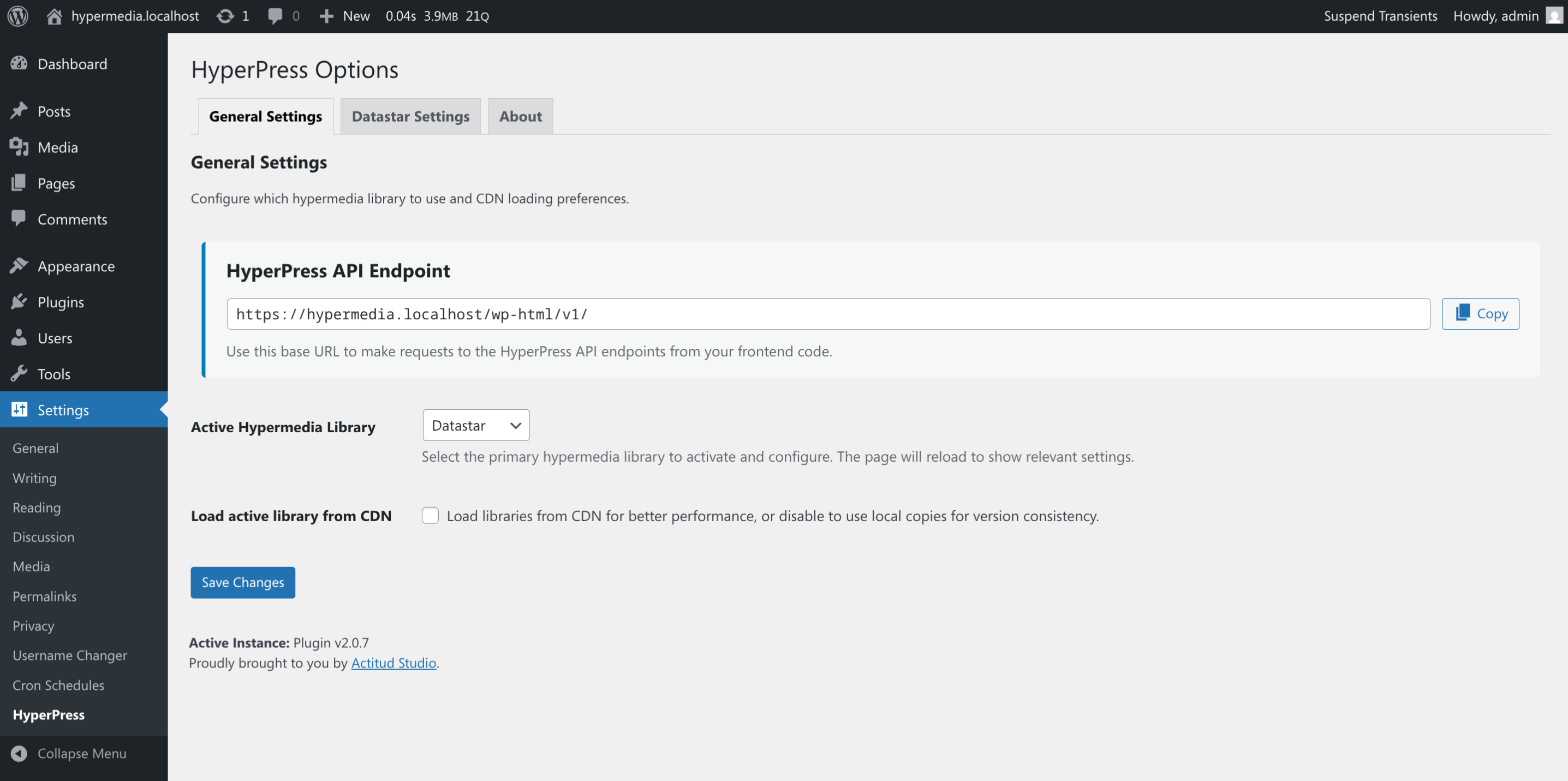
- Open Settings > HyperPress and choose which libraries to load.
- Add HTMX, Datastar, or Alpine attributes to your markup, or build a PHP block with HyperBlocks.
- Point requests at the
/wp-html/v1/endpoint (or use the provided helpers). - Your page is now reactive, with no JavaScript written.
Screenshots

Blocks
This plugin provides 3 blocks.
- HB Quote Block (JSON) A quote block with author attribution and styling – block.json implementation.
- HB Hero Banner (JSON) A hero banner block with headline, subtitle, and call-to-action button – block.json implementation.
- HB Content Card (JSON) A content card block with title, image, and nested content area – block.json implementation.
Installation
- Install HyperPress from the WordPress plugin directory. Go to Plugins > Add New and search for “HyperPress” (or “HTMX”, “Datastar”, or “Hypermedia”).
- Activate the plugin.
- Configure HyperPress at Settings > HyperPress. Choose which hypermedia libraries to load and whether to use local files or the CDN.
- Add hypermedia attributes to your markup, or register a PHP block with HyperBlocks.
- Enjoy reactive WordPress without JavaScript.
FAQ
-
What is hypermedia, and why use it in WordPress?
-
Hypermedia extends hypertext to handle richer interactions directly in HTML. Instead of a JavaScript SPA that calls a JSON API, your server returns HTML fragments and the browser swaps them into the page. You get simpler code, smaller payloads, and a model that stays close to how WordPress already renders templates. HTMX and Datastar are the modern hypermedia libraries that make this practical, with Alpine alongside HTMX for client-side reactivity.
-
Do I need to write JavaScript?
-
No. You write HTML attributes (for example
hx-get,hx-post, Alpinex-data, or Datastar signals) and server-side PHP. The hypermedia libraries handle the interactivity. If you want to extend behavior further, Hyperscript and Alpine let you add small expressions without a build step. -
Which libraries are included?
-
HyperPress bundles two hypermedia engines, HTMX (with Hyperscript) and Datastar, plus Alpine Ajax with Alpine.js as a companion to HTMX. Each loads only when you use it. All are served locally from the plugin folder by default; a CDN option is available as an explicit opt-in.
-
How do I render HTML fragments from the server?
-
HyperPress exposes a
/wp-html/v1/REST namespace for partial HTML rendering. Your callback returns an HTML fragment, and HTMX, Alpine Ajax, or Datastar swaps it into the page. Helpers likehp_get_endpoint_url()build the request URLs for you. -
Can I build Gutenberg blocks with PHP?
-
Yes. The bundled HyperBlocks library lets you register and render WordPress blocks using PHP templates and
block.json, with server-side rendering. Two authoring modes are available: a fluent PHP API and standardblock.json. No React or build pipeline required. -
Does HyperPress include custom fields?
-
Yes. The bundled HyperFields library provides a decoupled custom-field system with conditional logic, options pages, and export/import. Define fields in PHP and read values with
hf_get_field(). -
Will loading these libraries slow down my site?
-
No. Libraries load only when a page actually uses them, so unused libraries add no overhead to a request. You can also enable only the libraries you need on the Settings page.
-
Where is the full FAQ?
-
You can read the full FAQ on GitHub.
-
Suggestions or support?
-
Please open a discussion.
-
Found a bug or error?
-
Please open an issue.
Reviews


Contributors & Developers
“HyperPress | Hypermedia for WordPress (HTMX or Datastar)” is open source software. The following people have contributed to this plugin.
Contributors
Translate “HyperPress | Hypermedia for WordPress (HTMX or Datastar)” into your language.
Interested in development?
Browse the code, check out the SVN repository, or subscribe to the development log by RSS.
Changelog
3.5.6 / 2026-07-30
- Fixed: Re-enabled the Settings > HyperPress options page. The plugin adapter now opts in via the
hyperpress/admin/show_menufilter, so the page appears when HyperPress is active and stays hidden when HyperPress-Core is consumed as a standalone Composer library. - Changed: Hardened the plugin bootstrap and dropped the Jetpack Autoloader. Bootstrap now relies solely on the Composer autoloader; each library self-initializes at
after_setup_themebehind its own first-to-boot guard. Class references switched to::classfor Mozart-prefix safety. - Changed: Upgraded the bundled Hyper libraries (HyperFields 1.5.0, HyperBlocks 1.4.0, HyperPress-Core 1.5.0).
- Changed: Modernized the readme and plugin header floor (Requires at least 6.5, Requires PHP 8.2).
3.5.5 / 2026-07-24
- README: documented how HyperPress loads under Jetpack and what consumers bundling it must do.
3.5.3 / 2026-07-24
- Dependency refresh. Bundled
vendor/updated to pull HyperPress-Core 1.4.2, which carries HyperBlocks 1.3.3’suseBlockProps()dynamic-block editor-preview fix. Re-tagged so the update reaches WordPress.org users.
3.5.2 / 2026-07-23
- Patch release. No functional changes.
3.5.0 / 2026-07-16
- Tooling:
scripts/version-bump.shnow supports non-interactive flags (--patch,--minor,--major,--version X.Y.Z) with a machine-parseableRESULT:output line. No plugin, API, or behavior changes.