
Description
WordPress press widget to list category and subcategories of posts/custom taxonomies of custom post types.
Онцлогууд
-
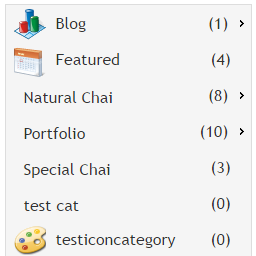
It allows users to add custom icons for category or for subcategory or for custom taxonomies
-
It lists categories and subcategories in user-friendly horizontal pattern. Please refer screenshots.
-
Category icons can be edited/removed/update with new icons under edit category or under edit custom taxonomy admin screen
-
Admin settings of this widget has facility control display on/off for category icons
-
Admin settings of this wiget has facility to show/hide count of posts in categories
-
Admin settings of this widget has facility to show/hide empty categories in widget
-
Title of widget can be customized in widget settings
-
Compatible with blocks under widgets section
My Links
Screenshots

screenshot-1.png 
screenshot-2.png 
screenshot-3.png 
screenshot-4.png 
screenshot-5.png 
screenshot-6.png 
screenshot-7.png 
Installation
Download this plugin and activate it
Go to appearence -> Widgets and select Category and subcategory list widget and move to left or right side bar.
Under widget settings, set appropriate following options,
Set the required option to show or hide empty categories, show or hide count, select custom taxonomy or default category and Save it
Set the required option to show/hide category icosn
Verify it in front end screens in right/left side bar according to your settings.
FAQ
-
Do you have any questions?
Reviews


Contributors & Developers
“Category and Subcategory List Widget” is open source software. The following people have contributed to this plugin.
Contributors
“Category and Subcategory List Widget” has been translated into 2 locales. Thank you to the translators for their contributions.
Translate “Category and Subcategory List Widget” into your language.
Interested in development?
Browse the code, check out the SVN repository, or subscribe to the development log by RSS.
Changelog
7.3
Compatible with WordPress 6.9. Tested upto 6.9 WordPress version
6.0
Update: Category icons upload option will also be available for custom taxonomies and compatible with latest WordPress version 6.1.