

Description
WebDecoy is a free, fully-functional bot detection and protection plugin that works 100% locally. It stops the symptoms you actually see: card-testing hits on your WooCommerce checkout, waves of fake registrations, comment spam, login brute force, and content scraped by AI crawlers. Unlike CAPTCHA solutions that frustrate visitors, WebDecoy uses invisible multi-layer detection: legitimate users never see challenges or interruptions.
Works immediately on activation. No account needed. No API key required. No external connections at all until you optionally connect a WebDecoy Cloud account.
Why WebDecoy?
- Zero friction: humans never see CAPTCHAs or challenges
- Zero configuration: install, activate, done
- Zero dependencies: everything runs locally on your server
- Deception, not just filtering: hidden tripwires and honeytokens that only bots can touch, so a catch is a certainty, not a guess
- Multi-layer detection: server-side + client-side + proof-of-work challenges
- Free forever: full protection at no cost. Premium cloud features are optional.
Stop WooCommerce card testing and fake orders
Card-testing bots run stolen card numbers through your checkout. You pay a gateway fee for every attempt, your decline rate climbs until the processor takes notice, and real orders drown in the noise. WebDecoy watches checkout the way a fraud analyst would:
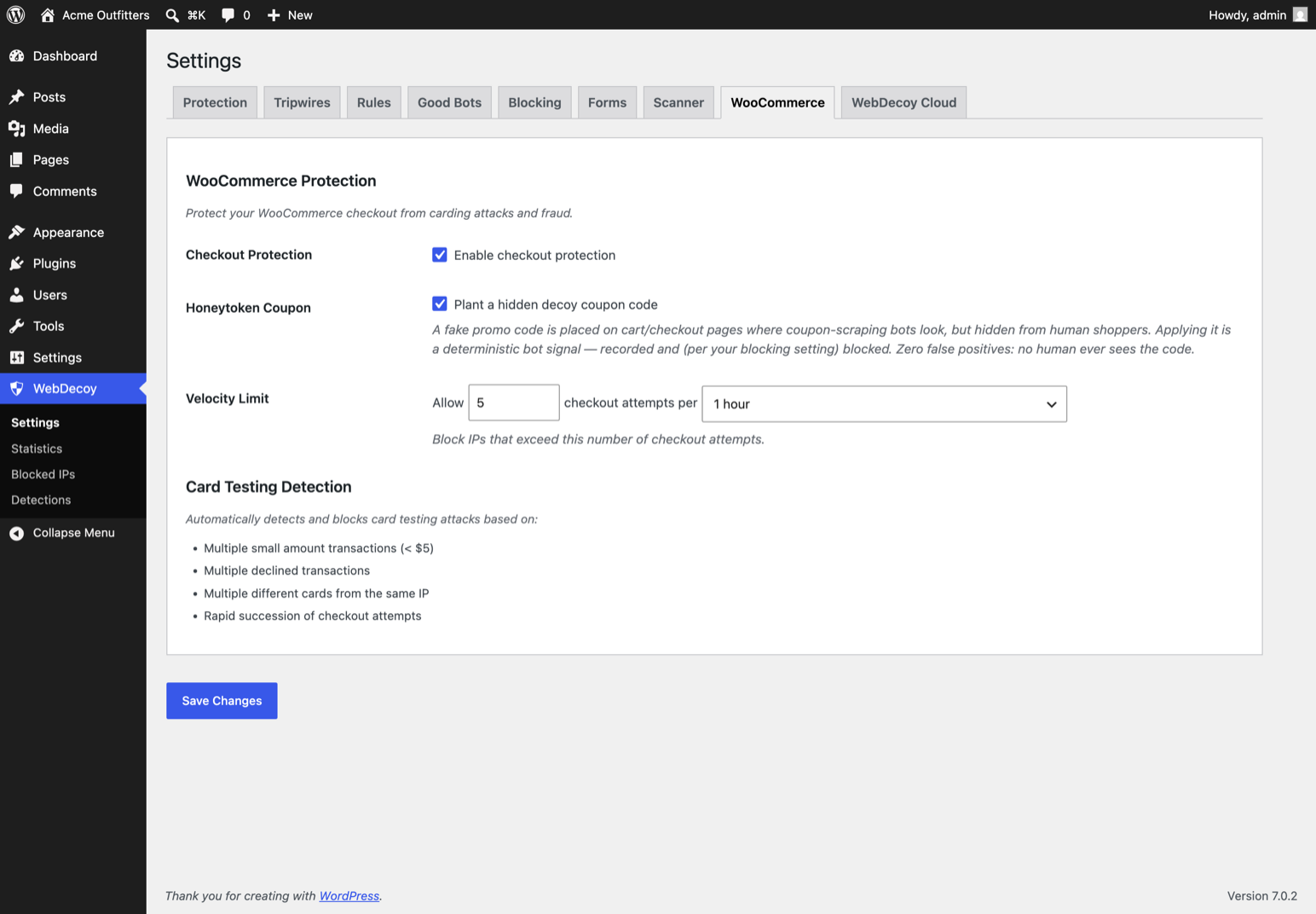
- Velocity limits per address (configurable attempts per time window)
- Card-testing pattern detection: small amounts, rapid succession, repeated declines across more than one card
- A hidden decoy coupon code that only bots ever find and apply
- Works with both the classic checkout and WooCommerce Blocks
Suspicious checkouts are refused and recorded, not silently allowed. And by default the whole plugin runs in monitor mode, so you can watch exactly what it would have done before you let it act.
Deception: the zero-false-positive layer
Most security plugins guess whether a visitor is a bot from signatures and scores. WebDecoy also sets traps that no legitimate visitor can trigger:
- Tripwires: hidden honeypot paths that only crawlers and scanners request
- Honeytoken links: invisible decoy links injected into your pages; following one is a deterministic bot signal
- Deceptive responses: fake .env, wp-config, SQL dump, and phpinfo responses seeded with per-site canary credentials; anyone who uses those credentials is flagged as critical
- WordPress-native traps: fake vulnerable-plugin paths, an optional XML-RPC trap, and an author-enumeration canary
- WooCommerce honeytoken coupon: a hidden decoy coupon code; applying it at checkout is proof of a bot
A visitor that touches a trap was not browsing your site. That is what makes deception the highest-confidence signal in the plugin: it does not need to guess.
An invisible reCAPTCHA alternative
Every form WebDecoy protects works without a visible challenge. Instead of asking humans to prove themselves, it asks the browser: an invisible SHA-256 proof-of-work challenge solves itself in the background in under a second for a real visitor, while bots and automation frameworks stall or fail. If you came here looking for a CAPTCHA alternative or an invisible reCAPTCHA replacement for comments, login, or registration, that is what this is: the same protection with none of the traffic-light puzzles, and nothing about your visitors sent to a third party.
Block fake registrations and comment spam
Registration spam and comment spam are the same disease: automation pointed at your forms. WebDecoy puts invisible honeypot fields on comment, login, and registration forms, scores each submission’s behavior, and adds login brute force protection with rate limiting on top. Real visitors notice nothing; the fake accounts and spam comments stop arriving.
Free Features (No API Key Needed)
Deception & Traps
* Tripwires on hidden honeypot paths (on by default)
* Auto-injected honeytoken decoy links
* Deceptive fake-file responses with canary credentials
* WordPress-native traps and author-enumeration canary
* WooCommerce decoy coupon
WooCommerce Protection
* Checkout carding attack prevention
* Velocity limiting (configurable attempts per time window)
* Card testing pattern detection
* WooCommerce Blocks compatible
Server-Side Detection
* User-Agent analysis and HTTP header inspection
* Good bot verification (reverse DNS for Googlebot, Bingbot, etc.)
* MITRE ATT&CK path analysis (admin probing, config file access)
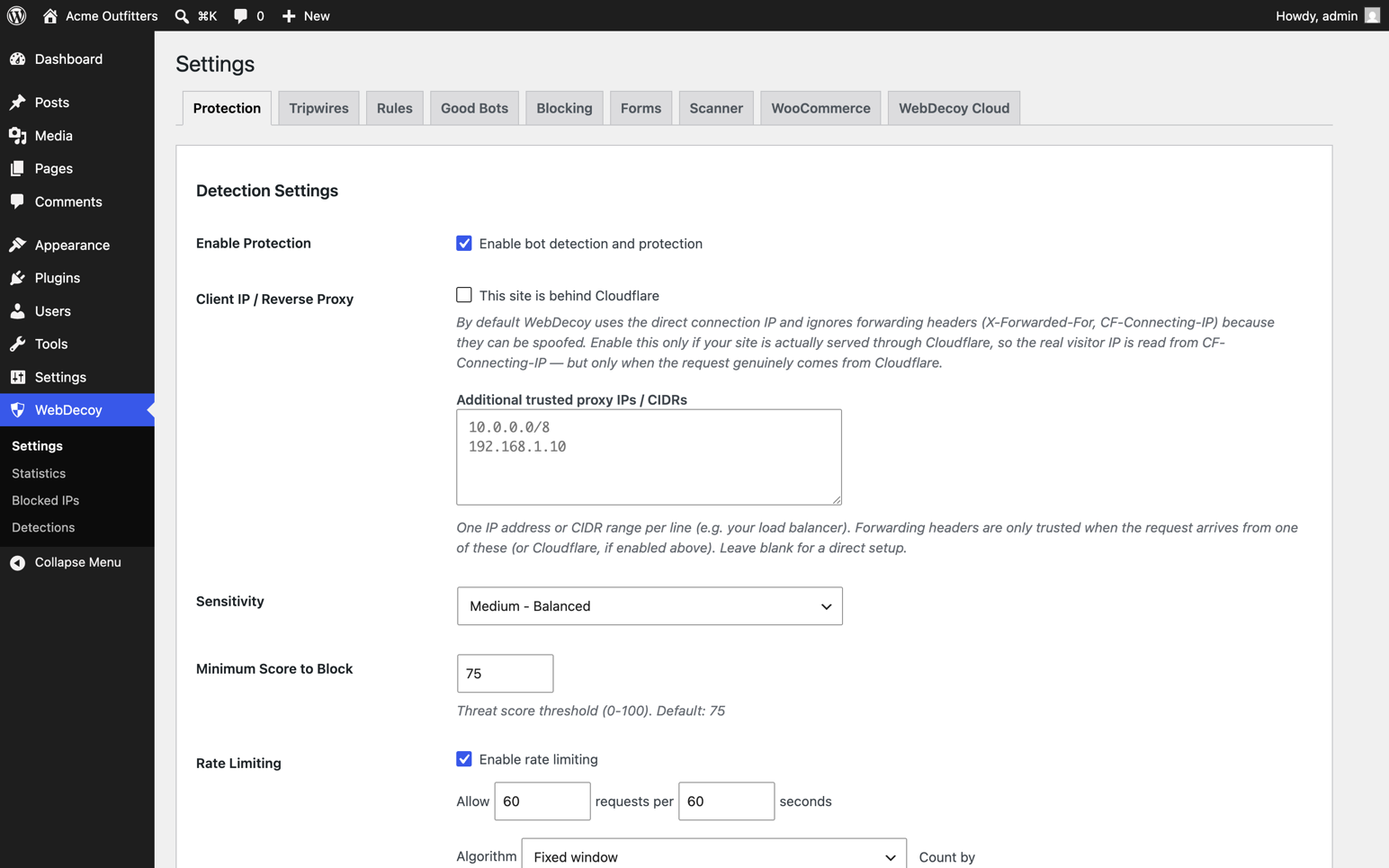
* Rate limiting with automatic blocking
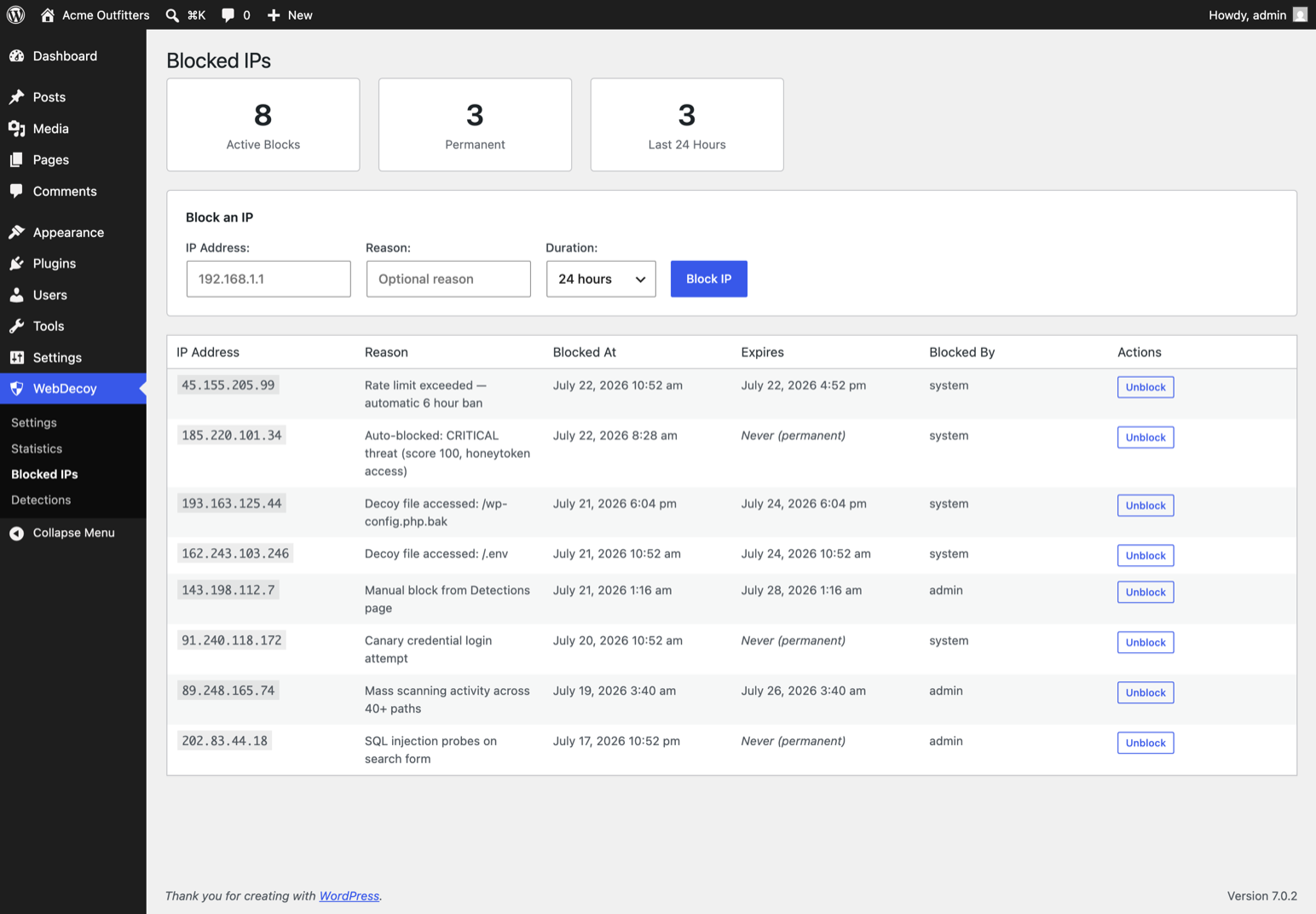
* IP blocking (individual + CIDR, IPv4/IPv6, expiration)
Client-Side Detection
* WebDriver detection (Selenium, Puppeteer, Playwright)
* Headless browser detection (Chrome headless, PhantomJS)
* Automation framework detection
* Behavioral analysis (mouse movement, click patterns, scroll behavior)
* Canvas/WebGL fingerprinting
* AI crawler detection (GPTBot, ClaudeBot, PerplexityBot)
Invisible Proof-of-Work Challenges
* SHA-256 challenges solved in background (no user interaction)
* Challenge mode for suspicious requests (checkbox widget, auto-solves)
* Difficulty scales based on threat signals
* No external CAPTCHA service needed
Form Protection
* Comment spam protection
* Login brute force protection
* Registration spam prevention
* Invisible honeypot fields on comment, login, and registration forms
Local Dashboard & Analytics
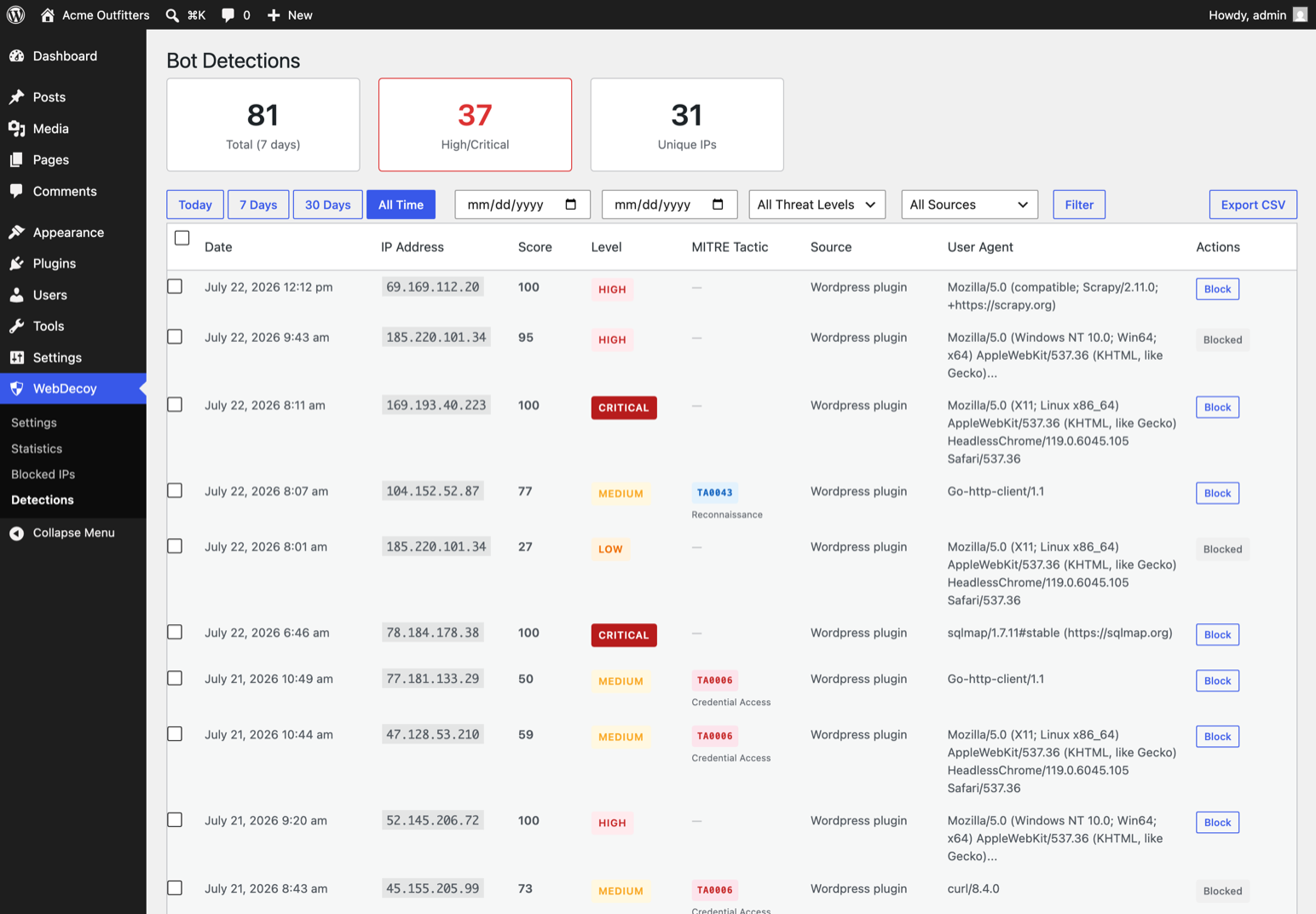
* Detection log with threat scores and MITRE tactic mapping
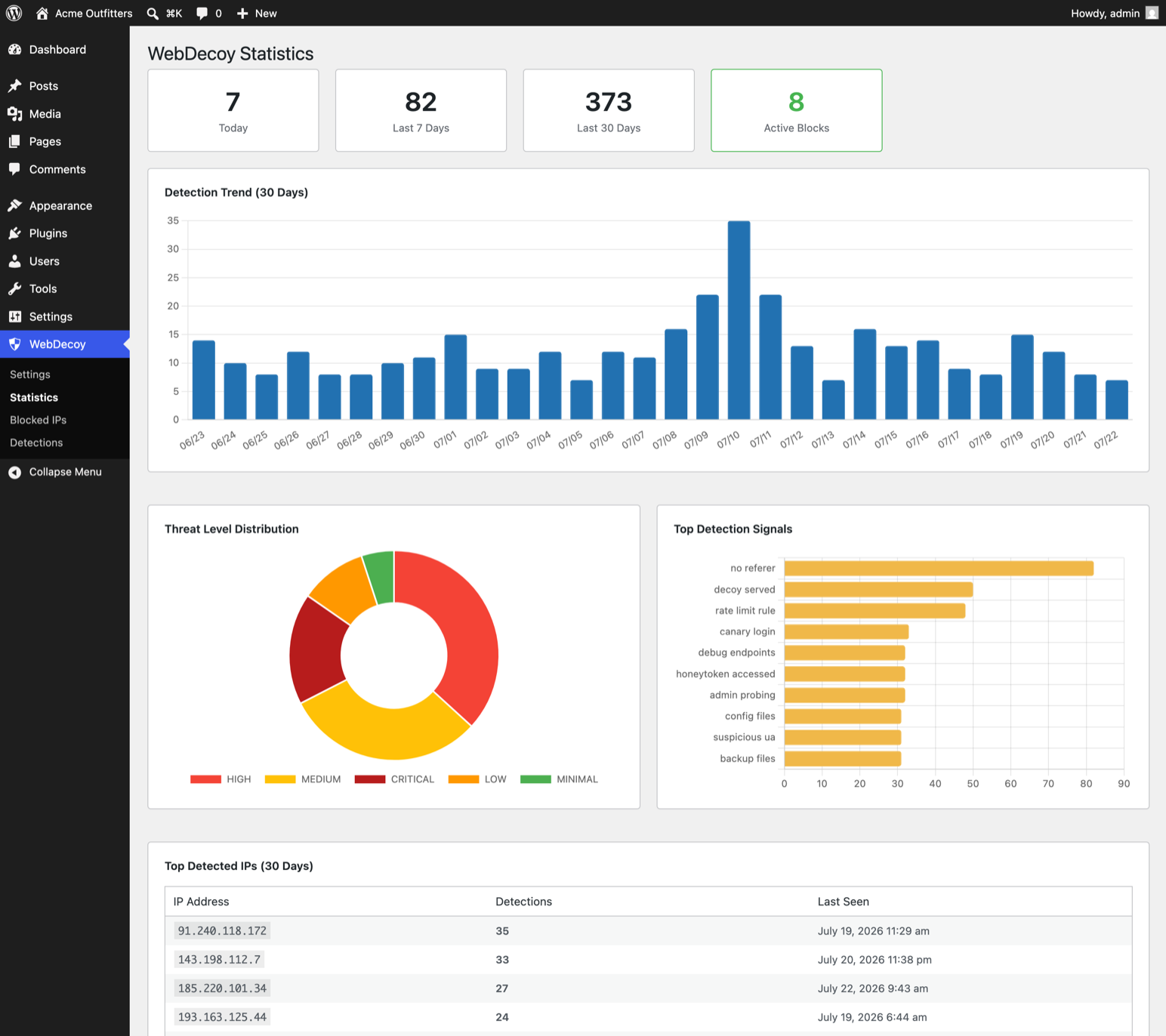
* Statistics page with 30-day trend charts
* Blocked IPs management
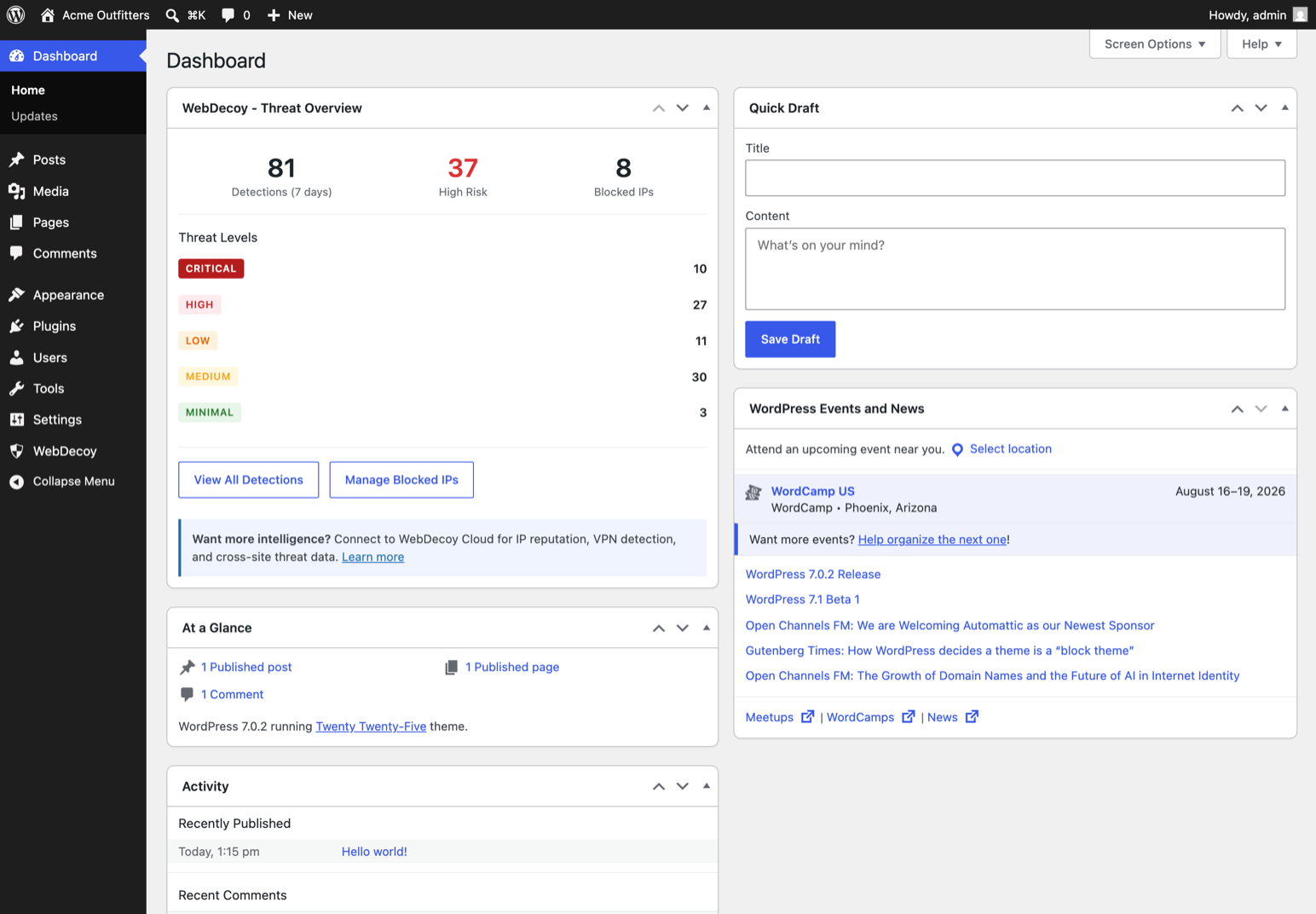
* Dashboard widget with threat overview
* CSV export
* Automatic data cleanup (30 days)
Smart Bot Recognition
* 60+ known good bots automatically allowed
* Search engines, social media, monitoring services, SEO tools
* Optional AI crawler blocking
* Custom allowlist support
Private by design: 100% local, GDPR-friendly
Until you deliberately connect a WebDecoy Cloud account, the plugin makes zero external connections:
- No visitor IP addresses sent to external servers
- No US data transfers and no third-party data processor to disclose
- No third-party cookies and no external CAPTCHA service
- No CDN-loaded scripts (even Chart.js for the admin charts is bundled locally)
Detection data lives in your own WordPress database and is cleaned up automatically after 30 days (configurable). If you build privacy-conscious or GDPR-focused sites, this is the architecture you have been filtering for: cloud CAPTCHAs and cloud WAFs make your visitors someone else’s data; WebDecoy keeps them yours.
Built for agencies: configure everything in code
Agencies do not click through wp-admin on 80 client sites. WebDecoy is fully controllable from a deploy script:
wp plugin install webdecoy --activate
wp webdecoy config set mode monitor
wp webdecoy allowlist add 203.0.113.7
wp webdecoy status
The wp webdecoy command covers status, every safe setting (config list), the IP allowlist (whitelist your agency VPN across every client site in one loop), and log flushing.
Settings you never want a client to change live in wp-config.php:
WEBDECOY_DEFAULT_MODE(‘monitor’ or ‘block’): forces the mode and locks the admin toggleWEBDECOY_HIDE_ADMIN_UI(true): hides the WebDecoy menu, dashboard widget, and notices from the client’s viewWEBDECOY_MAX_LOG_RETENTION(days): keep client databases lightWEBDECOY_DISABLE(true): emergency kill switch
And because monitor mode is the default, baking WebDecoy into your boilerplate cannot break a client site on day one: it detects, logs, and reports everything but blocks nothing until you decide otherwise.
Premium Features (Optional WebDecoy Cloud)
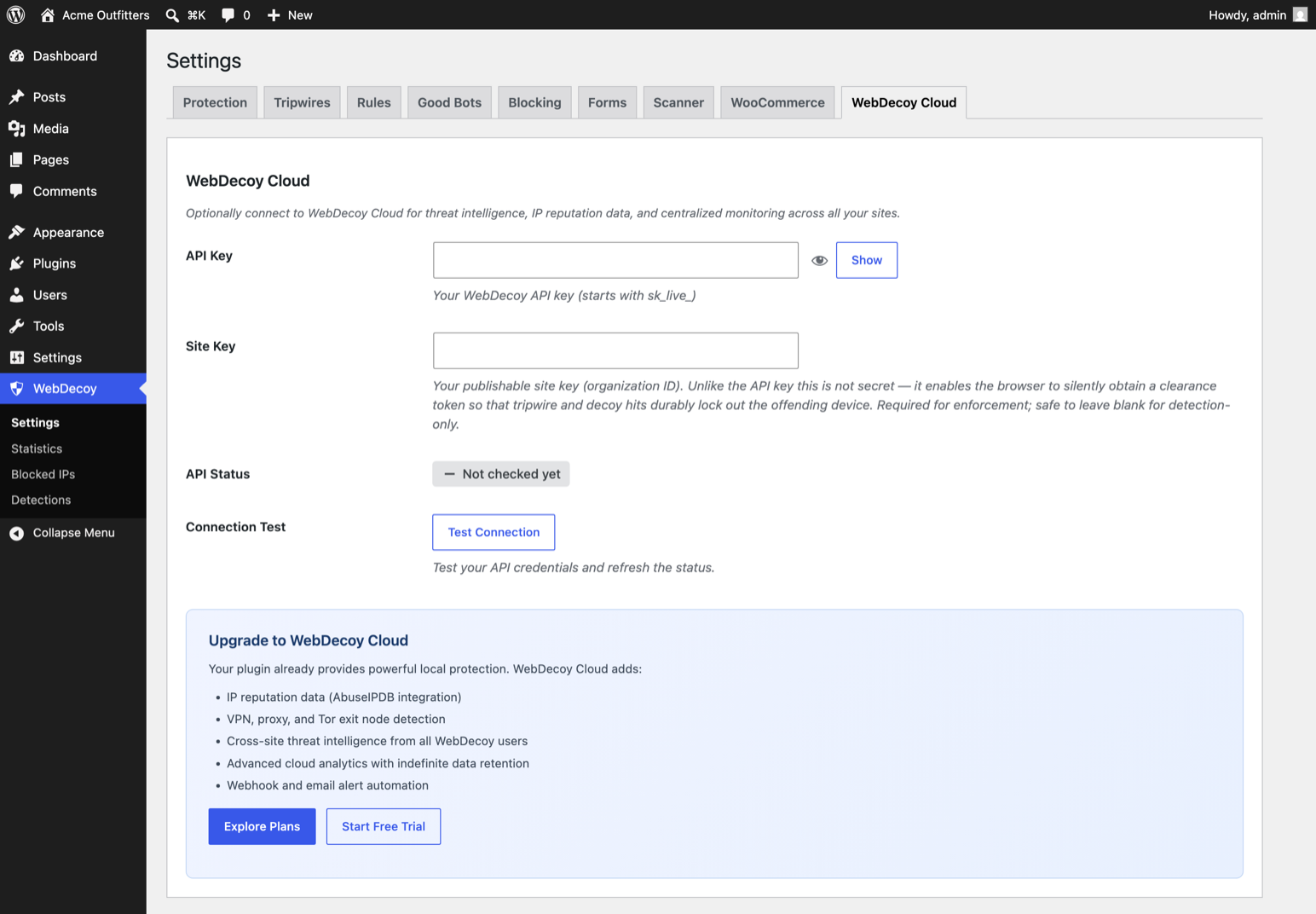
Connect an API key to unlock cloud-powered intelligence:
- WAF Integrations: arm your existing edge. Push confirmed attackers to Cloudflare or AWS WAF so they’re blocked before a request ever reaches WordPress, plus webhooks for any other firewall
- IP Reputation: AbuseIPDB integration, threat scoring
- VPN/Proxy Detection: identify visitors hiding behind VPNs, proxies, and Tor
- GeoIP Enrichment: geographic data from MaxMind
- Cloud Sync: forward detections to a centralized dashboard
- Cross-Site Intelligence: aggregate threat data from all WebDecoy customers
- Advanced Analytics: cloud dashboard at app.webdecoy.com with indefinite history
- Webhooks & Alerts: automated response chains, email notifications
Explore Plans | Start Free Trial
Threat Scoring
WebDecoy uses an intelligent scoring system (0-100):
- 0-19 MINIMAL: allow (likely human)
- 20-39 LOW: log only
- 40-59 MEDIUM: optional challenge
- 60-74 HIGH: challenge or block
- 75-100 CRITICAL: automatic block
The threshold is fully configurable to match your site’s needs.
External Services
This plugin can optionally connect to the following external services when you connect a WebDecoy Cloud account, either with the one-click Connect button or by entering an API key manually:
WebDecoy Cloud: app.webdecoy.com, api.webdecoy.com and ingest.webdecoy.com
This plugin only contacts WebDecoy Cloud after you explicitly start a connection on the WebDecoy Cloud settings tab. With no connection made and no API key configured, no data is ever sent to these services.
What is sent, and when:
* When you click “Connect to WebDecoy Cloud”: your browser is redirected to app.webdecoy.com to approve the connection (carrying your site URL, site name, a one-time nonce, and your monthly-report preference). After you approve, the plugin exchanges a one-time token with api.webdecoy.com (sending the token, your site URL and the nonce) to receive the site’s API keys. Cancelling sends nothing further.
* After connecting: the plugin fetches your plan entitlements from ingest.webdecoy.com (authenticated with your API key) twice daily.
* When a detection or rule violation occurs: the visitor’s IP address, user agent, request path, threat score and detection flags are sent to ingest.webdecoy.com so the event appears in your cloud dashboard.
* When you use an IP-reputation filter rule (e.g. ip.abuse_score, ip.tor): the visitor’s IP address is sent to ingest.webdecoy.com to look up reputation/geo data.
* When validating your key or forwarding a WooCommerce checkout detection: your API key, organization ID and the detection data above are sent to api.webdecoy.com / ingest.webdecoy.com.
All requests are made server-side over HTTPS. This is an optional cloud service provided by WebDecoy.
Terms of Service: https://webdecoy.com/terms
Privacy Policy: https://webdecoy.com/privacy
Without an API key, the plugin operates 100% locally, with no external connections on the front end or back end. Chart.js (used for the admin Statistics charts) is bundled with the plugin, not loaded from a CDN.
Bundled third-party libraries
Chart.js v4.5.1 (MIT license) is included at admin/js/vendor/chart.umd.min.js for the admin Statistics charts. It is the official distribution build; the human-readable source is available at https://github.com/chartjs/Chart.js/releases/tag/v4.5.1 . No other third-party libraries are bundled.
Reference URLs in the good-bot database
The bundled good-bot list (sdk/src/GoodBotList.php) stores a documentation URL for each known bot (e.g. developer.amazon.com/amazonbot, api.slack.com/robots) purely as reference metadata shown alongside detections. These URLs are never requested by the plugin. No connection of any kind is made to them.
Privacy Policy
WebDecoy collects the following data locally for bot detection purposes:
- IP addresses
- User agent strings
- HTTP headers
- Browser fingerprint signals
- Request patterns
This data is stored in your WordPress database and automatically cleaned up after 30 days. No data is sent externally unless you configure a WebDecoy Cloud API key.
For more information, see our Privacy Policy.
Screenshots
Installation
- Upload the
webdecoyfolder to the/wp-content/plugins/directory, or install directly from the WordPress plugin repository - Activate the plugin through the ‘Plugins’ menu in WordPress
- That’s it! Protection is active immediately with sensible defaults
Optional: Connect to WebDecoy Cloud
- Go to WebDecoy > Settings > WebDecoy Cloud tab
- Click Connect to WebDecoy Cloud. You approve the connection on app.webdecoy.com and are returned automatically; your API keys are provisioned for you
- Prefer manual setup? Expand Advanced: manual configuration and enter an API key from your WebDecoy dashboard
- Cloud features (threat intel, VPN detection, etc.) activate automatically
FAQ
-
Who builds WebDecoy?
-
A team of security engineers who do bot detection full time, across more than WordPress. The detection engine in this plugin is the same one that runs in our Node.js SDK, our Cloudflare edge validator, and the WebDecoy cloud platform; the WordPress rules engine is kept byte-for-byte compatible with the Node implementation by a shared test suite. The plugin is free and fully functional because detection is the half of the problem we give away: the paid product is the network response built on top of it.
-
Is WebDecoy an invisible reCAPTCHA alternative?
-
For most sites, yes. WebDecoy protects comment, login, and registration forms with invisible honeypot fields, behavioral scoring, and a background proof-of-work challenge, so real visitors never solve a puzzle, pick out traffic lights, or click a checkbox. If a request looks suspicious, the challenge runs silently in the browser instead of interrupting the person. And unlike reCAPTCHA, nothing about your visitors is sent to a third party.
-
Does it stop comment spam and fake user registrations?
-
Yes. Comment, login, and registration forms get invisible honeypot fields and behavioral scoring out of the box, all on by default. The plugin starts in monitor mode, recording what it would have done; switch blocking on and spam that scores above your threshold is challenged or blocked before it reaches your moderation queue.
-
Do I need Cloudflare or a WAF in front of my site?
-
No. WebDecoy runs entirely inside WordPress, so it protects sites on any host with no DNS changes, no proxy, and no subscription. If you were weighing WAF options, it works as a WAF alternative at the application layer, and it sees things a network WAF cannot: which form was submitted, which coupon was applied, which hidden trap was touched. It also works fine behind Cloudflare or another proxy if you already have one. On paid plans the relationship inverts: WebDecoy can push confirmed attackers to your Cloudflare or AWS WAF so they are blocked at the edge before reaching WordPress at all.
-
How is WebDecoy different from a firewall or malware scanner?
-
Firewalls match requests against known-bad signatures, and scanners look for infections after the fact. WebDecoy adds a third approach: deception. It plants traps (hidden paths, invisible links, decoy files, a decoy coupon) that no legitimate visitor can touch, so when a trap fires there is no doubt. It works alongside your existing firewall or scanner, and on paid plans it can push confirmed attackers to Cloudflare or AWS WAF.
-
Do I need an API key?
-
No. WebDecoy works 100% locally without any API key or account. All detection, blocking, rate limiting, form protection, and WooCommerce protection works out of the box. The API key is only needed for optional cloud features like IP reputation and VPN detection.
-
What does WebDecoy Cloud add?
-
WebDecoy Cloud adds threat intelligence feeds (AbuseIPDB, VPNAPI, MaxMind), centralized monitoring across multiple sites, indefinite detection history, automated response features like webhooks and email alerts, and WAF integrations: confirmed attackers can be pushed to Cloudflare or AWS WAF so they’re blocked at the edge, before ever reaching your server. Compare plans.
-
Does WebDecoy slow down my site?
-
No. WebDecoy adds less than 5ms of latency to requests. Server-side detection runs in milliseconds. The client-side scanner loads asynchronously with the
deferattribute and doesn’t block page rendering. -
Will it block legitimate visitors?
-
WebDecoy is designed to minimize false positives. You can adjust the sensitivity and blocking threshold. Start with “Log only” mode to monitor before enabling blocking. Good bots (Googlebot, Bingbot, etc.) are automatically recognized.
-
Does it work with caching plugins?
-
Yes. WebDecoy works alongside popular caching plugins. The client-side scanner runs after page load, and server-side checks happen before caching.
-
What about search engine bots?
-
WebDecoy automatically recognizes and allows 60+ legitimate bots including Googlebot, Bingbot, and other search engine crawlers. Good bot verification uses reverse DNS lookup. Your SEO won’t be affected.
-
Can I block AI training crawlers like GPTBot and ClaudeBot?
-
Yes. WebDecoy identifies AI crawlers (GPTBot, ClaudeBot, PerplexityBot, Bytespider, and others) and lets you block them with one setting, without touching robots.txt and without affecting search engine crawlers. Enable this in Settings > Good Bots.
-
Does it work with WooCommerce?
-
Yes. WebDecoy includes specialized carding protection for WooCommerce including checkout velocity limiting, card testing detection, and automatic fraud blocking. Compatible with both classic checkout and WooCommerce Blocks.
-
Is my data secure?
-
Without an API key, the plugin makes zero external connections: visitors’ browsers never contact third-party servers, and neither does your server. Chart.js (admin charts) is bundled with the plugin. All detection data stays on your server, and detection logs are automatically cleaned up after 30 days. When you optionally connect WebDecoy Cloud, all communication is encrypted over HTTPS (see External Services below).
-
How does the proof-of-work challenge work?
-
When a suspicious visitor is detected and your block action is set to “Challenge”, they see a checkbox widget. Clicking it starts a SHA-256 puzzle that solves in the background (typically under 1 second for humans). Bots and automation tools take much longer or fail entirely. No external CAPTCHA service is involved.
Reviews
There are no reviews for this plugin.
Contributors & Developers
“WebDecoy Bot Detection – Block AI Crawlers, Spam Bots & Card Testing” is open source software. The following people have contributed to this plugin.
Contributors
Translate “WebDecoy Bot Detection – Block AI Crawlers, Spam Bots & Card Testing” into your language.
Interested in development?
Browse the code, check out the SVN repository, or subscribe to the development log by RSS.
Changelog
2.7.1
- Removed: the canary trip email introduced in 2.7.0. The canary link sits on every public page, so busy sites would receive an email every hour, forever. Detections belong on the Detections page, not in your inbox. Everything else from 2.7.0 stays: the canary URL in settings, the trip-it-yourself prompt, and the Detections page recording every hit.
2.7.0
- Added: your canary is now visible and testable. The honeytoken’s secret path is shown in Settings (Tripwires tab) with a ‘Trip it now’ link, on the Detections page when it is empty, and in the dashboard widget. Open it yourself and watch the detection arrive: the fastest proof the whole pipeline works.
- Added: an email to the site admin when the canary trips, whether it was a bot that found the hidden link or you testing the pipeline. At most one email per hour; on by default, toggle under Settings, Tripwires tab. Bait-path and fake-plugin tripwires stay email-silent (public scanners hit those constantly; nothing legitimate ever touches the canary).
2.6.0
- Added: a reserved test User-Agent that proves your install end to end. Run curl -A “WebDecoy-Test/1.0” https://your-site.example/ and the plugin records a detection and answers with a 403 JSON receipt, so the curl output itself shows the plugin acted. On sites connected to WebDecoy Cloud the event also appears in your dashboard within seconds, labeled as a test and excluded from stats and billing. The test never blocks your IP, never trips enforcement rules, and never sends alerts.
2.5.0
- Added: a wp webdecoy WP-CLI command for agency deploy scripts. wp webdecoy status reports mode, cloud connection, detection counts, active blocks, and retention. wp webdecoy config list/get/set covers every safe setting, including config set mode monitor|block. wp webdecoy allowlist add|remove|list manages the IP allowlist (whitelist your agency VPN across every client site in one loop). wp webdecoy logs flush clears the local detection log.
- Added: wp-config.php constants for code-locked configuration. WEBDECOY_DEFAULT_MODE (‘monitor’ or ‘block’) forces the mode, overrides the stored setting, and locks the admin toggle; a settings save while forced can no longer silently drift the stored mode. WEBDECOY_HIDE_ADMIN_UI hides the WebDecoy menu, dashboard widget, and admin notices for white-label installs (the plugin stays visible in the Plugins list on purpose). WEBDECOY_MAX_LOG_RETENTION overrides the 30-day detection retention (1 to 3650 days).
- Changed: an unrecognized WEBDECOY_DEFAULT_MODE value is ignored rather than guessed. Forcing ‘block’ on a typo would enforce on a site that asked to watch; forcing ‘monitor’ would disarm one that asked to enforce.
2.4.1
- Fixed: cloud features switch on immediately after one-click connect. The connection itself succeeded, but the premium status stayed off until a later background revalidation, so the JS verification token and cloud reporting were silently inactive at the exact moment you had just connected.
- Fixed: the dashboard widget’s “Learn more” link landed on the Protection tab instead of the WebDecoy Cloud tab.
- Changed: the Statistics page upsell now opens the in-admin Cloud connect tab instead of leaving your site for the pricing page.
2.4.0
- Added: filter rules can read what the WebDecoy edge validator concluded about a request, using new edge.* fields: edge.class, edge.clearance, edge.present, and the shorthands edge.verified / edge.crawler / edge.script / edge.browser. edge.class is one of: verified (an identity Cloudflare attested, such as Googlebot, never degrade these), crawler (says it is a crawler, unproven), script (an HTTP client library, not a browser), or browser (nothing non-human fired). This was always matchable as req.header(“x-wd-class”), but nothing said so; the Rules screen now documents the fields and what each value means. If the validator is not in front of a request, edge.present is false and every edge.* condition is false. That means “no information”, not “human”. Safe for blocking, throttling, logging and metering; the Rules screen also explains why you should not use it to serve different page content on a cacheable URL.
2.3.4
- Added: tripwires can Challenge (browser proof-of-work) or Log only, not just block or serve deception. Log is the safest way to watch a tripwire you have just armed. Challenge needs JavaScript and a click, so nothing automated completes it. On a tripwire, that is the point.
- Fixed: timestamps are stored in UTC and converted for display. They were written in site-local time and compared against UTC, so on any non-UTC site the Today / 7d / 30d filters covered the wrong span and the WooCommerce checkout window was the wrong width. Older rows are left alone rather than shifted, since shifting is wrong for any site that has changed timezone; the discrepancy ages out.
2.3.3
Follow-up to the 2.3.2 safety release. WooCommerce and reporting fixes.
- Fixed (WooCommerce): the 2.3.2 card-testing fix did not reach stores using Cash on Delivery, Bank Transfer or Cheque. Those gateways never mark an order paid, so every genuine order kept counting as a card-testing attempt. Now decided from the order’s status, which every gateway reaches.
- Fixed (WooCommerce): a customer retrying a declined card could look like card testing on their own. The small-amount, decline-count and rapid-succession patterns now require more than one order or more than one card.
- Fixed (WooCommerce): payment results arriving from a gateway callback did not close the checkout attempt they belonged to, so attempts stayed open and kept counting.
- Fixed: the cross-site attacker list is actually read again. In 2.3.2 it was synced hourly and consulted by nothing.
- Fixed: two notices claimed an attacker was blocked network-wide, or would be on Pro. Neither has been true since 2.3.2 stopped that list from blocking. They now say the actor is recognised.
- Fixed: the monitor-mode summary no longer reports that nothing met the bar for enforcement while rate limiting is being withheld.
2.3.2
Safety release. Please update. This version deliberately makes the plugin do less by default.
- Monitor mode is now the default. WebDecoy detects, logs and reports everything and blocks nothing until you switch blocking on under Blocking Monitor mode. Existing sites are moved to monitor mode by this update.
- Fixed: behind Cloudflare, a load balancer or most managed hosts, every visitor resolved to the proxy’s address, so one hostile request could block real visitors for 24 hours. The plugin now detects that condition, refuses to block while it holds, and tells you in the admin.
- Fixed: automatic blocks can no longer target loopback, private ranges, a trusted proxy, or your own CDN front door, and can no longer write a range wider than /24 (IPv4) or /48 (IPv6).
- Fixed: block expiry was stored in UTC and compared against site-local time, so on sites at UTC+1 or further east a short block expired the instant it was written.
- Fixed: a honeypot hit blocked the address permanently instead of for the configured duration.
- Fixed (WooCommerce): three successful sub-$5 orders in an hour were classified as card testing. Completed orders no longer count toward card-testing patterns or the checkout velocity limit. Note: stores using only Cash on Delivery, Bank Transfer or Cheque are not covered by this fix yet, because those gateways never mark an order paid. Monitor mode means it cannot cost you an order in this version.
- Changed (WooCommerce): a suspicious checkout is refused and recorded; it no longer blocks the address across your whole site. Covers both the classic and the Blocks checkout.
- Fixed: monitor mode and the kill switch now apply everywhere the plugin can act: the checkout, the honeytoken coupon, the challenge page, login, comments and registration all previously kept refusing traffic while the admin said nothing was blocked.
- Fixed: the monitor-mode setting is stored rather than only defaulted, so the checkbox shows the real state and saving another setting no longer switches enforcement on by accident.
- Changed: default block duration is 1 hour, was 24.
- Changed: the cross-site actor feed is now advisory intelligence and no longer writes to your block list. Rows it previously wrote are removed on upgrade.
- Added:
define('WEBDECOY_DISABLE', true);in wp-config.php as an emergency off switch.
2.3.1
- Fixed: Detections forwarded from your site are now identified by the visitor’s own request signature. Previously they were identified by your server’s outgoing connection, which is the same for every visitor, so every visitor a site reported was grouped into a single “actor” in the dashboard. Only request header NAMES plus Accept-Language and Accept-Encoding are sent; no header values leave your site.
2.3.0
- Added: One-click WebDecoy Cloud connect. Approve on app.webdecoy.com and your API keys are provisioned automatically; manual key entry moved under “Advanced: manual configuration”
- Added: Optional monthly security report opt-in when connecting
- Added: Plan entitlements sync after connecting (twice daily, fails open to the free tier)
- Fixed: Statistics page charts could grow endlessly tall once detection data existed (Chart.js containers now have a fixed height)
2.2.3
- Changed: All CSS and JavaScript is now loaded via the WordPress dependency APIs (wp_register_style/script, wp_add_inline_script, wp_print_styles/scripts). No more raw style/script tags
- Changed: The “Protected by WebDecoy” credit on the challenge page is now opt-in (Settings > Blocking) and off by default
- Changed: Updated bundled Chart.js to v4.5.1 (latest stable)
- Changed: Removed the load_plugin_textdomain() call (unneeded since WordPress 4.6 for directory-hosted plugins)
2.2.2
- Fixed: A PHP 7.4 fatal error in good-bot verification (use of a PHP 8 function)
- Fixed: Timezone-safe date handling throughout
- Changed: The bundled SDK now uses the WordPress HTTP API exclusively (removed the raw cURL fallback)
- Changed: Requires WordPress 6.1+; tested up to WordPress 7.0
- Internal: Full WordPress Plugin Check compliance (resolved 69 flagged items)
2.2.1
- Changed: Chart.js (admin Statistics charts) is now bundled with the plugin instead of loaded from a CDN. The plugin makes no external requests until you connect a WebDecoy Cloud account
- Changed: Clarified the External Services disclosure
- Internal: Refactored the self-hosted updater into its own module
2.2.0
- Added: Tripwires. Deterministic, zero-false-positive blocking of hidden honeypot paths (on by default)
- Added: Honeytoken. An auto-injected invisible decoy link armed as a tripwire (on by default)
- Added: Filter rules. Expression-based rules with an admin rule builder (ip.* / req.* fields)
- Added: IP enrichment (VPN/proxy/Tor, geo, ASN, abuse score) powering ip.* filter fields
- Added: wd_clearance enforcement loop. Silent cookie minting + tripwire forwarding for rotation-proof device lockouts
- Added: Stealth-browser (F1) detection. Catches automation that patches native browser functions
- Added: Deceptive tripwire responses. Fake .env/wp-config/SQL/phpinfo with per-site canary credentials; canary logins flagged as critical
- Added: WordPress-native traps. Fake vulnerable-plugin paths, optional XML-RPC trap, author-enumeration canary
- Added: WooCommerce honeytoken coupons. A hidden decoy coupon; applying it is a deterministic bot signal
- Added: IP allowlist (Settings Blocking)
- Improved: Rate limiting runs as a rule. Proper 429 + Retry-After + X-RateLimit-* headers, sliding-window algorithm, per-IP/route/user keying
- Improved: Resilient violation reporting (DB spool + cron retry, no page latency)
- Changed: Consolidated onto a single detector path; removed legacy dead code
2.1.0
- Added: JS execution verification. Detects non-JS HTTP scrapers
- Added: Challenge token meta tag for premium page serve tracking
2.0.0
- Major: All detection and protection now works locally. No API key required
- Added: Invisible proof-of-work (PoW) challenge system
- Added: Behavioral scoring for form submissions
- Added: Statistics page with Chart.js detection trend charts
- Added: Enhanced detections page with date filters, CSV export, bulk actions
- Added: WebDecoy Cloud settings tab (optional premium features)
- Added: Cloud upsell sections throughout dashboard
- Improved: Settings page restructured. Protection tab is now default
- Improved: Dashboard widget with cloud intelligence upsell
- Changed: CDN update checker gated behind WEBDECOY_SELF_HOSTED constant
- Changed: Version bump to 2.0.0 signaling architecture change
- Fixed: PHP 7.4 str_ends_with polyfill (already present)
1.3.8
- Fixed: Removed no_plugins trigger (deprecated in modern browsers, caused false positives)
1.3.7
- Version bump
1.3.6
- Protection hooks only activate when API key is validated as active
- E2E test compatibility
1.3.5
- Security improvements and code hardening
- Updated WooCommerce compatibility to 9.4
- Performance optimizations for detection checks
1.3.0
- Major performance improvements
- Added bulk IP blocking/unblocking
- Enhanced good bot detection (60+ bots)
- Improved WooCommerce checkout protection
1.0.0
- Initial release